


Introduction
How to fix a slow website frustrates visitors and pushes your earned traffic away. This impacts both user experience and SEO rankings. In today’s fast-paced digital world, speed is a necessity.
This blog breaks down simple, actionable steps to make your site load faster. From optimising images to smart caching, you’ll learn practical fixes. This keeps users engaged and search engines happy. A quicker site creates visitors and lower bounce rates. It also brings a noticeable boost in your search rankings. Let us get your website moving.
Table of Contents
The High Cost of the "Spinning Wheel" for SMEs and Bloggers
The 2026 Reality Check
Search engines have changed. Google no longer treats speed as a bonus. It treats it as a baseline. If your site is slow, it struggles to compete. Even great content would not save it.
For UK businesses, this matters more than ever. Local competition is rising. Users expect instant results. If your site delays, someone else gets the click. The speed of a website is survival.
The Bounce Rate Connection
Here is a simple truth. When a page takes too long to load, people leave. Studies show that a 2-second delay can increase bounce rates by over 30% on mobile. That means one in three users may never see your content.
This is why many site owners search “why website loading is slow”. The issue is not always obvious. But the impact is always real.
The Conversion Gap
Speed directly affects revenue. A faster site feels easier to use. Users stay longer. They explore more and trust in your brand.
For a marketing manager, improving site user experience speed is the key task in any audit. It does not need new ads. It removes friction and kills conversions.
Running the Diagnostic: Your UK-Focused Speed Audit
The “User-Centric” Approach
Old methods focused on servers. Today, the focus is on users. Real User Monitoring (RUM) shows how actual visitors experience your site. This shift matters. A site may look fast in testing, but feel slow to users on mobile data in London or Manchester.
Critical Tools for the 2026 Landscape
PageSpeed Insights. This tool shows two types of data:
- Field Data: Real user experience
- Lab Data: Simulated performance
Both of them matter. Field data tells the truth, and the lab data helps you fix issues.
GTmetrix (London Server)
Location matters. Testing from a London server gives a realistic view for UK audiences. It reveals delays caused by distance and hosting choices. For SMEs targeting British users, this step is essential.
Search Console (Core Web Vitals Report)
This report highlights which pages fail performance standards. Instead of guessing, you can see:
- Which URLs are slow
- Which needs improvement
- Which already perform well
This shows how to fix a slow website performance with precision.
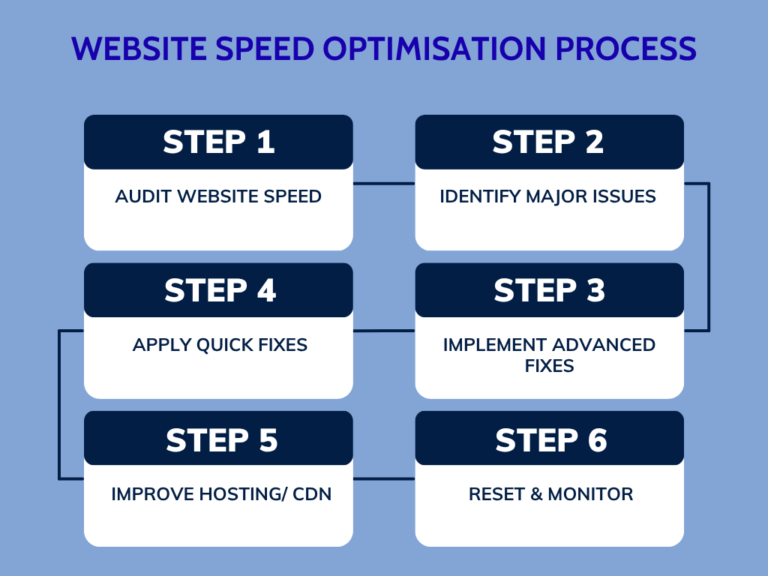
Quick-Win Website Speed Optimisation Techniques
Next-Gen Formats
Switching to modern formats like AVIF can reduce file size by up to 20% compared to older formats. The result is Faster load times without losing quality. This is one of the easiest ways on, how to reduce page load time.
Video Offloading
Hosting videos on your own server is risky. Video files are heavy, and they slow everything down. Instead, use platforms like YouTube or Vimeo. Embed the video and let them handle the load. Your site stays fast, and your users stay happy.
Solving the “Plugin Bloat” Problem
Plugins are helpful. But too many of them are harmful.
The Audit Protocol
Check your plugins carefully. Ask simple questions:
- Does this plugin run on every page?
- Is it actually needed?
- Is it slowing things down?
Many plugins load scripts everywhere, even where they are not used. That is wasted performance.
Functionality vs. Performance
Sometimes one lightweight tool can replace three heavy ones. Fewer plugins mean fewer scripts. Fewer scripts mean faster pages. It is a direct path to follow website speed optimisation techniques.
Advanced Technical Fixes: How to Reduce Page Load Time
Now we go deeper. These changes need more effort. But they deliver strong results.
Eliminating Render-Blocking Resources
When a page loads, some files delay what users see. These are called render-blocking resources.
CSS Splitting
Not all CSS is needed at once. By separating critical CSS (needed for the top of the page), you allow the browser to show content faster. The rest can load later. Users see something quickly.
JavaScript Deferral
JavaScript can block the page. Using async or defer allows the browser to load content first, then run scripts. This improves perceived speed. And perception matters as much as reality.
Server-Side Optimisations & Edge Caching
Sometimes the issue is not the page. It is the server that moves to HTTP/3. HTTP/3 improves how data travels across the internet. It reduces delays and handles packet loss better. It speeds up connections.
For UK users, this can make a noticeable difference.
Object Caching (Redis/Memcached)
Dynamic sites often query databases repeatedly. Caching stores results temporarily. This reduces server load. The result is faster response times, especially for platforms like WooCommerce.
Mastering the 2026 Core Web Vitals (CWV)
Core Web Vitals measure user experience. They focus on three key areas.
LCP (Largest Contentful Paint)
This measures how fast the main content appears. Fixing the hero image on your page matters most. If this image loads fast, your page feels fast.
- Preload it
- Compress it
- Avoid lazy loading it
INP (Interaction to Next Paint)
This measures how your site responds to actions. Clicks should feel instant. It helps to improve site user experience speed in a real way.
To improve this:
- Reduce heavy scripts
- Limit background tasks
- Keep the main thread free
CLS (Cumulative Layout Shift)
Nothing frustrates users more than shifting content. Ad Space Reservation sets fixed sizes for images and ads. This prevents sudden jumps. A stable page feels polished and builds trust.
The Local Advantage: UK Hosting and CDNs
Speed depends on distance. A server far away takes longer to respond.
Latency Matters
If your server is outside the UK, your users feel the delay. Even small delays add up. For businesses targeting cities like London or Manchester, local hosting can improve performance.
Cloudflare & Workers
Content Delivery Networks (CDNs) solve this problem. They store copies of your site across multiple locations. When a user visits, they get content from the nearest server. This makes “how to fix a slow website” partly a geography problem. Edge computing takes it a step further by processing data closer to the user.
Maintenance: The "Speed-First" Content Workflow
Speed is not a one-time fix. It requires ongoing attention.
Image Compression Standards
Every new blog post should follow a simple checklist:
- Resize images before upload
- Compress files
- Use next-gen formats
This keeps your site fast over time.
Script Monitoring
Old scripts often stay unnoticed. Tracking pixels from platforms like Facebook or TikTok can slow your site. Review them regularly and remove what you do not need. Small changes can bring big improvements.
Conclusion
A fast website is not about technology. It is about experience. Users expect speed, and search engines demand it. If you want to fix slow website performance, start simple and go deeper.
Focus on what users feel. Not what the tools report. Because in the end, speed is measured in trust, engagement, and growth.
Frequently Asked Questions
1. How to fix a slow website quickly?
Start by compressing images, removing unused plugins, and enabling caching. These simple steps can instantly improve loading speed and user experience.
2. Why is the website loading slowly even with good hosting?
Slow speed often comes from heavy images, too many scripts, or poor code structure. Even strong hosting cannot fix front-end performance issues alone.
3. How does website speed affect SEO rankings?
Search engines use speed as a ranking factor, especially through Core Web Vitals. A faster site improves visibility, crawl efficiency, and user engagement.
4. What are Core Web Vitals, and why do they matter?
They measure loading speed, interactivity, and visual stability of a page. Good scores help improve both rankings and overall user experience.
5. What is the easiest way to reduce page load time?
Optimise images, use a CDN, and defer unused JavaScript files. These quick fixes can significantly reduce loading time without coding complexity.