

Introduction
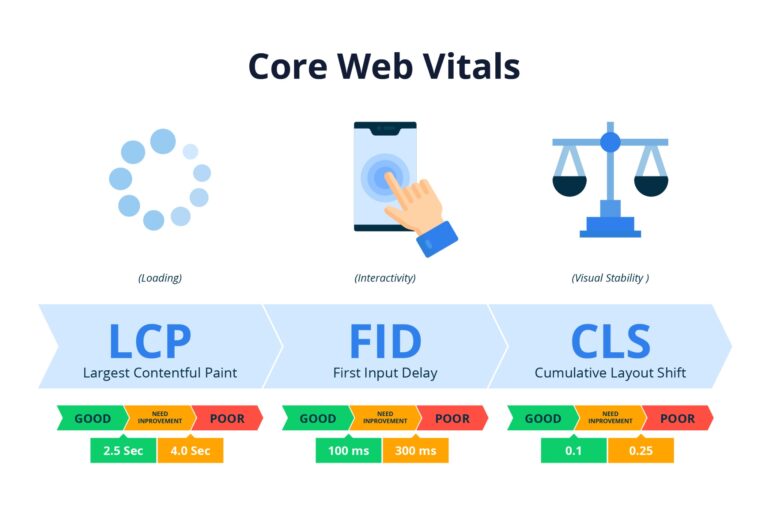
In SEO, user experience is a direct ranking factor. Google’s Core Web Vitals act as the benchmark for measuring a website’s user experience. These metrics tell you exactly how fast your site loads. It also shows how it responds to user interaction. It includes Largest Contentful Paint, Cumulative Layout Shift, and Interaction to Next Paint. In this blog, we’ll break down what these metrics mean and how they impact your search rankings.
Table of Contents
The 2026 Performance Paradigm
For years, many teams chased green scores. That approach no longer works.
The Shift from Lab to Field
Tools once relied on simulated tests. They still matter. But today, real-world data leads the way. The Chrome User Experience Report captures user interaction with your site. It covers different devices, networks and avoids real frustration. A page might score well in a lab. Yet struggle in the field. That gap is where rankings change.
The Revenue Correlation
Performance is financial. Faster pages lead to:
- Lower bounce rates
- Higher engagement
- More completed purchases
Even small gains matter. A slight improvement in website performance optimisation can increase conversions. For eCommerce stores and SMBs, this is a measurable growth.
Pillar Alignment
Most businesses understand the basics. They compress images, reduce scripts, and use caching. But today’s landscape demands more. You must move from basic fixes to a structured performance strategy. This helps the system to evolve with your site.
Mastering the "Big Three": High-Impact Technical Remediation
Each Core Web Vital targets a different user experience issue. Together, they form a complete picture.
LCP (Largest Contentful Paint): Solving the "Resource Load Delay"
LCP measures how fast the main content appears. That first visual matters more than anything. If it lags, users feel it instantly.
The Preload Priority
Your hero image or main heading must load first. Using fetchpriority=”high” tells the browser what matters most. It removes hesitation. The browser acts with intent.
Server-Side Optimization
Slow servers delay everything. Time to First Byte (TTFB) is the starting line. Improve it with:
- Edge functions
- Smart caching
- stale-while-revalidate headers
These reduce wait time before the content even begins to load.
Modern Image Formats
Images often cause delays. Traditional formats are heavy. Move beyond WebP. Use AVIF where possible. It compresses better and Loads faster.
For complex layouts, vector-based assets can reduce weight without losing quality. The goalshow meaningful content fast.
INP (Interaction to Next Paint): The New Gold Standard for Responsiveness
INP replaced older metrics for a reason. It measures how quickly a page responds when a user interacts. If clicks, taps, and inputs do not happen right away, users lose trust.
Breaking the Main Thread
JavaScript can block everything. Long tasks freeze the page. When the browser is busy, it ignores user input. That delay hurts INP. Identify long tasks, split them, and reduce their impact.
Yielding to the Browser
Not all scripts need priority. Use tools like:
- scheduler.yield()
- requestIdleCallback
These allow the browser to focus on user actions first. Background tasks can wait.
The Third-Party Tax
External scripts are often the hidden problem. It covers tag managers, chat widgets, and ads. They add value, but at a cost. Audit them regularly. Remove what you do not need. Delay what you can. Responsiveness improves when clutter disappears.
CLS (Cumulative Layout Shift): Engineering Visual Predictability
Nothing frustrates users like shifting content. You try to click. The page moves. You hit the wrong button. That is Cumulative Layout Shift.
Aspect-Ratio Mastery
Browsers need space reserved in advance. Using CSS aspect-ratio ensures images and videos do not push content around. This is when they load. The layout stays stable.
Content-Visibility
Rendering everything at once slows pages. With content-visibility: auto, the browser only renders what is visible. Off-screen content waits. This improves both speed and stability.
Ad-Slot Stability
Ads are a major cause of layout shifts. The fix is simple in concept, tricky in practice. Reserve space using placeholder containers. Even if ads load late, they will not disrupt the layout. Predictability builds trust.
The SEO Specialist’s Toolkit: Advanced Debugging Workflows
Fixing issues requires clear thinking rather than assumptions.
Utilising the Performance Observer API
Modern debugging goes beyond tools. The Performance Observer API allows real-time tracking within the browser.
You can track:
- Layout shifts
- Input delays
- Paint events
This data shows exactly what users experience. Even better, attribution data reveals which element caused the issue. The results come with evidence rather than guessing.
Google Search Console vs. PageSpeed Insights
Many teams face conflicting reports. PageSpeed Insights shows lab data. It can be in the form of control and repeatable. Google Search Console shows field data with real users and conditions.
When they disagree, trust the field. Set up monitoring at two levels:
- Origin-level for overall performance
- URL-level for specific pages
Large sites enjoy this layered view. It helps prioritise fixes that matter most.
Strategy for eCommerce & SMBs: Scaling Performance without Sacrificing Features
Growth often adds complexity, features, scripts and more risk. Here, balancing speed and functionality is the challenge.
The Plugin Dilemma
Platforms like WordPress and Shopify make expansion easy. Install a plugin and add a feature. But each plugin adds weight. Audit them often and remove duplicates. Replace heavy tools with lighter alternatives.
The "Performance Budget"
Set limits before problems arise. Define how much JavaScript and CSS your site can handle. Stick to it when new features are proposed they must fit within that budget. This forces better decisions and prevents performance decay over time.
The Conversion Case Study
Speed impacts behaviour. A small improvement in LCP can reduce cart abandonment. It happens even by 200 milliseconds. Users feel the difference, even if they cannot explain it. That is the real value behind Google search ranking factors tied to performance.
Future-Proofing: Core Web Vitals as a Google Search Ranking Factor in the AI Era
Search is evolving. AI is changing how content is discovered. But performance remains critical.
Search Generative Experience (SGE)
AI-driven search pulls content quickly. It summarises and delivers answers fast. If your site is slow, it may not even be considered. Speed becomes a gateway rather than a ranking factor.
Beyond the Metrics
The current metrics are only part of the picture. It includes Largest Contentful Paint, Cumulative Layout Shift, and Interaction to Next Paint.
User experience is expanding. Future signals may include:
- Smooth scrolling
- Seamless navigation
- Flow between pages
The focus is shifting from isolated metrics to experience. Sites that feel effortless will win.
The Checklist
Here is a simple summary to guide your efforts:
- Prioritise key content for faster LCP
- Reduce JavaScript to improve INP
- Stabilise layouts to control CLS
- Use real-world data, not just lab scores
- Set performance budgets for future updates
- Audit third-party scripts regularly
Conclusion: Moving Toward a Performance-First Culture
Performance is not a task you complete. It is a habit you build. Websites change, content grows, and the features expand. Without continuous attention, the performance of the site declines.
Treat Core Web Vitals as an ongoing process. Instead of a one-time audit, consider monitoring, testing, and continuous improvement.
Frequently Asked Questions
1. What are Core Web Vitals and why are they important?
Core Web Vitals are a set of metrics that measure real user experience on a website. These signals are important because they focus on loading speed, interactivity, and visual stability. They also directly influence user satisfaction and are part of Google search ranking factors.
2. How does Largest Contentful Paint (LCP) affect SEO?
Largest Contentful Paint (LCP) measures how quickly the main content of a page loads. A slow LCP can increase bounce rates and reduce engagement. This can negatively impact search rankings and conversions.
3. What causes poor Interaction to Next Paint (INP) scores?
Poor Interaction to Next Paint (INP) scores are often caused by heavy JavaScript, long tasks blocking the main thread, and too many third-party scripts. These delays make a website feel unresponsive when users interact with it.
4. How can I reduce Cumulative Layout Shift (CLS) on my website?
You can reduce Cumulative Layout Shift (CLS) by reserving space for images and ads, using proper size attributes, and avoiding content that loads unexpectedly. Stable layouts improve user experience and reduce accidental clicks.
5. Are Core Web Vitals still relevant in 2026?
Yes, Core Web Vitals remain highly relevant. As search evolves, especially with AI-driven results, fast and stable websites are more likely to be crawled, indexed, and ranked effectively. Performance continues to be a key part of SEO strategy.