


Introduction
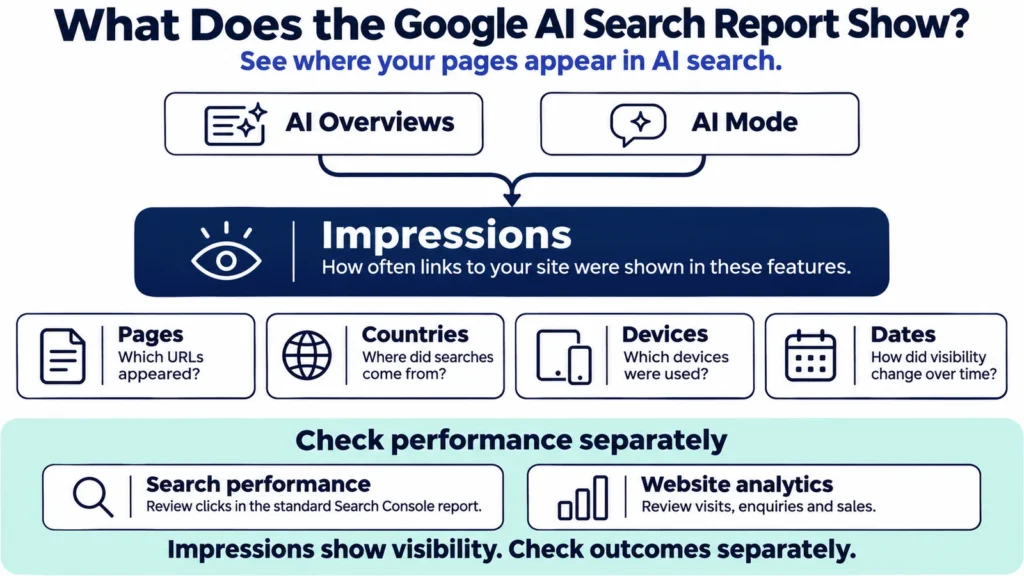
Google Search Console AI Reports help website owners monitor how often links to their pages appear in Google’s AI search experiences. The Generative AI performance report (Search) shows impressions from AI Overviews and AI Mode.
You can group them by page, country, device or date. Use it to spot changes and see which pages get shown. It cannot show whether those impressions led to enquiries or sales. Check it alongside your SEO reports and site data.
Table of Contents
What Does Google's AI Performance Report Actually Measure?
What the Generative AI Performance Report Includes
The Search report counts impressions from AI Overviews and AI Mode. An impression means a link to your site was shown in an AI feature. Google completed the worldwide rollout on 31 August 2026, though sites with too few impressions may not show the report.
Discover has a separate report, while Search Console excludes experiments in Search Labs. See Google’s official report guidance for current details.
Read the Key Data Points Without Confusion
Use the report’s views to see where impressions come from and how they change.
Data point | What it tells you | How to use it |
Impressions | Links shown in supported AI features | Track visibility over time |
Pages | URLs linked from AI features | Find pages receiving impressions |
Countries | Where searches originated | Compare target markets |
Devices | Desktop, tablet or mobile | Check device differences |
Dates | Daily, weekly or monthly patterns | Compare periods |
The chart shows site-level totals, while the table groups data by the selected dimension. Totals may differ because the two views use different types of aggregation. The latest figures can be preliminary, marked by a dotted line, and may change.
What the Report Does Not Tell You
Impressions do not prove clicks, rankings, leads or sales. The report does not show each prompt or every AI response that cited your page.
Its dimensions also do not split totals for AI Overviews and AI Mode. Treat the figures as a signal, then check other data before you change your SEO plan.
How to Use Google Search Console AI Reports to Measure Visibility
Find the Report in Your Search Console Property
Choose the right verified site in Google Search Console and open the Generative AI performance report (Search). The report has rolled out worldwide, but may remain absent if your site has too few AI impressions.
If it is missing, check the site you chose and make sure it is not blocked from Search AI features. Read Google’s control guidance for details.
Set a Reliable Comparison Period
Choose dates that match your question. For a content update, compare the periods before and after it went live. For regular reports, compare equivalent weeks or months.
A normal week compared with a holiday week can make a seasonal dip look like a trend. The latest data can still change. Google uses Pacific Time for dates, so daily totals may not match your local reporting day.
Filter the Data to Answer a Specific Question
Start with a clear question, then choose Pages, Countries, Devices or Dates. A search-type filter can compare text-based queries with multimodal searches that use images.
Export the chart and table if you need a saved record. Note the dates and filters used so the next report can be compared fairly.
Google AI Overviews Visibility Tracking: What to Check
Impressions by Page: Find the URLs Appearing in AI Search
Open Pages and find URLs that get impressions. Focus first on pages with a clear job, such as a service page, product page or guide. A high impression count does not make a page valuable by itself.
Review its audience, purpose and standard organic performance. If an important page has few views, check that Google can index it, the content helps readers, and other pages link to it.
AI Search Performance Trends: Spot Meaningful Changes
Look for patterns across comparable periods. A sustained rise may merit review, while a sharp fall needs investigation. Neither proves a cause; seasonality, user behaviour, site edits and reporting changes can all affect results.
Record major content updates and technical fixes, as these notes give context when performance shifts. Avoid labelling one day’s movement a trend, especially when totals are low, or the data is preliminary.
Distinguish Visibility Signals From Performance Outcomes
The report cannot show whether an impression led to a click or lead. Check site data for visits and sales or leads. Then compare it with the wider Search Console report. Be careful about cause and effect.
More visits after an impression rise does not prove AI Overviews caused it. Look at the page’s purpose and what visitors do after they arrive.
AI Mode Visibility Tracking: How to Read the Signals
Compare AI Search Patterns Carefully
Track total impressions from AI features, but do not assume the report gives a separate total for each one. The documented dimensions cover pages, countries, devices and dates, but do not split totals by AI feature.
Google says AI Mode and AI Overviews can show different links. So page visibility may vary, even though the report does not give a separate figure for each feature. Use it as an overall signal, not a record of every AI answer.
Use Country and Device Breakdown to Find Differences
Check Countries if your site serves several markets. Differences may point to local search intent, language, product availability or landing-page relevance. Use Devices to compare desktop, tablet and mobile.
If mobile impressions change, check the mobile site before blaming the device. These views help you ask better questions. They do not prove the cause.
Check Eligibility Before Diagnosing a Drop
If the report is missing or impressions reach zero, confirm the selected property and reporting period. Then review the site’s Search AI control. Excluded properties will not receive AI-feature impressions, and low impression volume can prevent the report from appearing.
Check Google’s inclusion guidance before assuming a technical fault; eligibility does not guarantee that a page will appear in AI search.
How to Turn AI Search Data Into SEO Actions
Choose AI Search Visibility Metrics That Matter
Track a small set of metrics linked to your goals: impressions over time, pages receiving impressions and changes by country or device. Note the date range and major site changes beside the figures.
This establishes a baseline and helps prevent knee-jerk reactions. Do not set targets from random percentage rises or competitor figures alone. Your starting point, goals and data show what progress should look like.
Connect AI Data With Organic Search Visibility
Compare the AI report with the standard Search performance report and website analytics. If an important page gains AI impressions as organic performance shifts, investigate both trends; do not assume one caused the other.
Check that the page answers the reader’s question, offers useful detail and can be reached through internal links. Google’s AI features guidance says the same SEO basics still matter. Keep content helpful and reliable.
Turn Findings Into a Repeatable Action Plan
Use a simple cycle:
- Set a baseline.
- Flag a clear change.
- Check the pages or markets involved.
- Make a change based on the data.
- Review the results over the same kind of period.
Note what changed and why. For example, record when and why you update a guide. Wait for later data before calling it a success.
Google does not require special AI markup or a separate optimisation method for inclusion in AI Overviews or AI Mode. Focus on sound SEO and content that helps readers.
Conclusion: Make AI Search Visibility Part of SEO Reporting
Google Search Console’s Generative AI performance report tracks impressions from AI Overviews and AI Mode. It also shows the pages, countries and devices behind the overall pattern.
Use Google Search Console AI Reports as visibility signals, not substitutes for traffic, lead or revenue data. Compare the trends with wider SEO results before you change your plan.
Midland Marketing can help businesses interpret search data and shape an SEO reporting plan. Contact the team to discuss your goals.
Frequently Asked Questions
Where Can You Find the Google Search Console AI Report?
Select your verified property in Search Console and open the Generative AI performance report (Search). If it is missing, check the property, date range, impression volume and inclusion settings.
Does Google Search Console Show AI Overviews and AI Mode Clicks?
The dedicated report focuses on impressions and does not break out clicks or conversions by AI feature. Wider Search Console and site data can add context, but they do not prove attribution.
Why Is the Generative AI Performance Report Missing?
Google says the report may not appear if a site has too few impressions from Search AI features. Check that you selected the correct property and have not excluded the site from these features.
Can You Measure AI Overviews and AI Mode Separately?
The report counts impressions from both features, but its views do not split them by feature. Do not report separate totals unless the live tool shows them.
How Often Should You Check AI Search Visibility?
Check the data on a set schedule that fits your site and reporting needs. Compare the same kind of period and look for lasting changes, not daily swings. The newest data may still change.

Written by - Lauren Davison
Introducing Lauren – one of our content writers who has a flair for SEO and creative strategy!
With a Master’s Degree in Creative Writing, Lauren has niched down into SEO and content writing.
Outside of work, she loves watching the darts, reading and the pub on the weekend.