


Introduction
You pour your heart into blog posts. You write guides, listicles, and news updates. Over time, your website swells. It grows fat with pages. Some of them are brilliant, and some are taking up the space. They offer no value. And the scary part? They might be holding your entire site back.
This is where content pruning comes in. It sounds a little violent, like you are going to chop down your hard work. But it is actually the kindest thing you can do for your website. It is about growth. If you want higher rankings, you cannot keep adding. You have to maintain and refine. Let us get into exactly how to do that.
Table of Contents
What Is Content Pruning?
Definition of Content Pruning
Content pruning is a strategic process. It is the careful review of everything on your website. You look at every single page. You analyse its performance. Then, you decide what to do with it. Some pages need a refresh, and some need to be combined with another page to make one super-strong guide.
The goal is to improve the quality of your site. Google wants to show users the best content. If you have a bunch of pages, you are telling Google you are a mediocre source. By pruning, you are curating your own work.
Why Content Pruning Matters for SEO
When you prune your site, you send strong content quality signals. First, you strengthen your topical authority. Imagine you are an expert on coffee. If you have ten weak articles about espresso, the weak ones dilute your expertise. If you prune the weak ones and merge the amazing guide, you look like the ultimate authority on espresso.
Second, you clean up the mess. Thin content removal gets rid of pages that have no reason to exist. This helps your rankings. This is because Google focuses on your good ones.
Finally, it helps with crawl efficiency. Google sends bots to crawl your site. This is called a crawl budget. Pruning directs the traffic where it matters.
Why Content Pruning Improves SEO Performance
Eliminates Thin and Low-Quality Content
Thin pages offer almost nothing to a reader. They have poor engagement metrics. People land on them and immediately hit the back button. This “bounce” tells Google the page is not satisfying the user. If you have too many of these, Google might start to think your whole site is low-value. Removing them cleans up your reputation.
Fixes Keyword Cannibalisation
Two pages fighting for the same ranking lead to keyword cannibalisation. Instead of one strong page ranking well, you have two weak pages competing with each other. Content pruning fixes this. Suddenly, all that power goes to one URL, and it shoots up the rankings.
Improves Crawl Budget Efficiency
Big sites have this problem the most. If you have an ecommerce store with out-of-stock products, Googlebot has to crawl them. It wastes its time in the basement when you want it in the showroom.
By removing or redirecting those old product pages, you tell Google. Look at these shiny new guides.” This is a massive win for SEO content optimisation. This is because you are helping the search engine help you.
Strengthens Internal Linking Structure
When you delete or consolidate weak pages, you then redirect them to your strong pages. Now, all the pages follow the pillar content. Your internal linking structure becomes a powerful network. This boosts your best articles rather than a messy tangle that drains power.
Signs Your Website Needs Content Pruning
Declining Organic Traffic
You check your analytics. Traffic is going down. You are publishing more, but getting less in return. This is a classic sign.
Sometimes, it is because of Google algorithm updates. They might have decided that the type of content you wrote three years ago is no longer good enough. If your traffic is dropping, it is time for an SEO content audit to find the pages that are dragging you down.
Large Number of Low-Traffic Pages
Go to Google Search Console. Look at the pages report and sort by impressions. You will find a massive list of pages with zero impressions. Nobody is even seeing them in the search results.
If a page has been up for a year and has zero clicks, it is dead weight. It is contributing nothing to your business. These pages are the primary targets for a website content clean-up.
Outdated or Irrelevant Content
Old statistics are another red flag. If you quote a stat from 2015, it makes your entire brand look out of touch. Event pages and predictions about trends that never happened need to be updated.
Duplicate or Similar Pages
Two service pages are basically the same. Google might see these as duplicate content and struggle to decide which one to rank.
This is common on business location pages. If every page copies and pastes the same text, swapping out the city name, you are in dangerous territory. These pages have no unique value.
Content Pruning vs Content Updating
When to Update Content
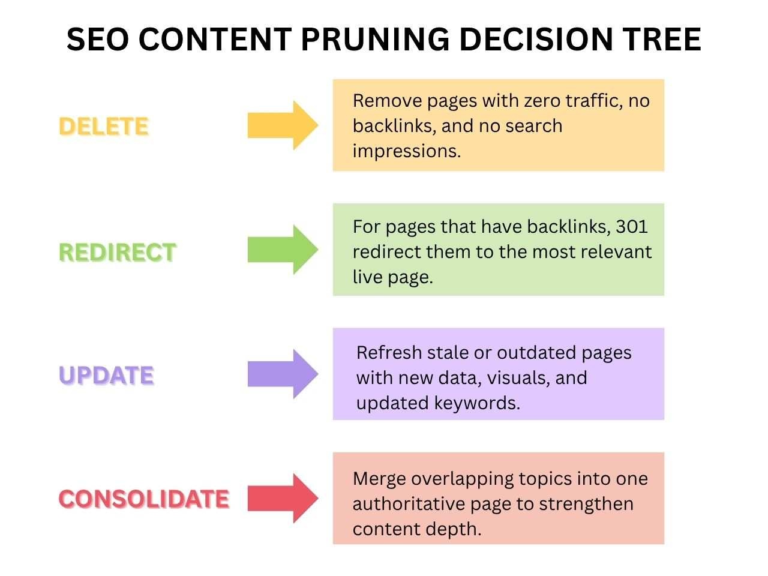
You should choose updating if the page already has some good things going for it. Check the backlinks. If another website linked to this page, it has value. You do not want to lose that. Also, look at the rankings. If it is sitting on page two or three of Google, it is close. Update the stats, add new sections, and refresh the publish date.
When to Merge Content
Consolidation is like merging two small companies to make a giant one. You choose this route when you have two or three pages that all cover similar ground.
By combining them into one massive guide, you create a resource that is far more valuable than the sum of its parts. This is a core part of content consolidation.
When to Delete Content
Sometimes, there is no saving it. You delete content when it has no traffic, no backlinks, and no strategic value for your business.
If a page is about a product you no longer sell, or a service you discontinued, delete it. If it is a press release from five years ago that no one cares about, delete it. But remember, if you delete a URL that has any value at all, you must set up a redirect strategy.
Step-by-Step Content Pruning Process
Step 1 – Conduct a Full Content Audit
Start by exporting all your website URLs. Use a tool like Screaming Frog or a simple XML sitemap exporter. Then, pull in data from Google Analytics and Google Search Console. You need to know:
- Page views (traffic)
- Average engagement time
- Impressions and clicks from search
- Backlinks (use Ahrefs or similar)
Step 2 – Categorise Each Page
Now, you play God. Look at your spreadsheet and put every page into one of four buckets:
- Keep: These are your stars. High traffic, good backlinks, relevant content.
- Update: Good potential, but old or weak. Needs a refresh.
- Merge: These pages cover similar topics. They should be combined.
- Remove: No traffic, no links, no hope.
Step 3 – Analyse Keyword Targeting
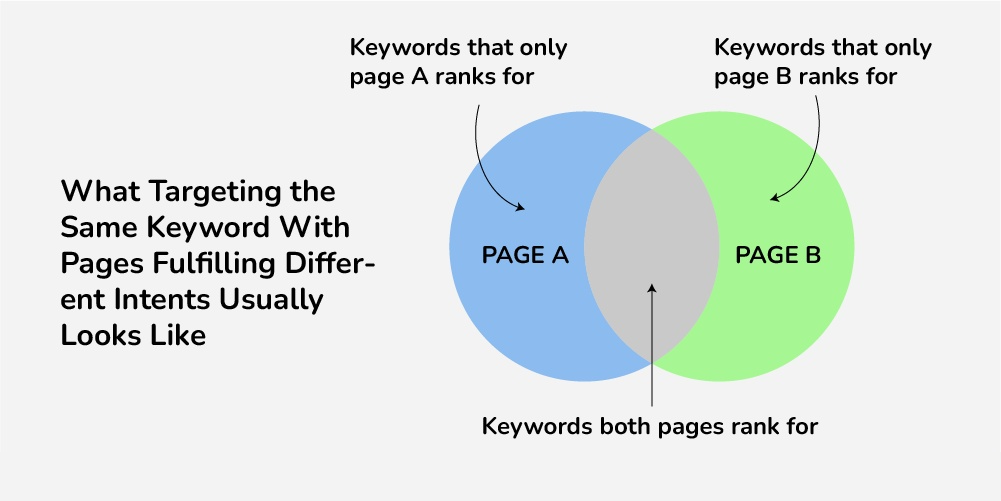
Look at the keywords your pages rank for. Are five different pages all trying to rank for the same thing? That is your cannibalisation list.
Also, check search intent. If you have a page meant to sell shoes that is ranking for “how to tie shoes,” the intent is wrong. You might need to join it with an informational guide.
Step 4 – Evaluate Backlink Value
Before you delete anything, check the backlinks again. This step is crucial. A page with 20 backlinks from other websites has authority. If you delete it without a plan, you lose all that power.
Those links are like votes for your site. You need to redirect those votes to a new page so you keep the authority.
Step 5 – Improve or Consolidate
This is the hands-on work. For pages in the “update” bucket, rewrite them. Add new research, improve the headings, and make them longer and more helpful.
For pages in the “merge” bucket, pick the best URL as the “winner.” Copy the best parts from the other articles into the winner. Make sure the new combined article flows well and covers the topic completely. Then, delete the “loser” pages.
Step 6 – Implement Redirects Properly
This is the technical part. Whenever you delete or merge a page, you must set up a 301 redirect. This tells the browser and search engines: “This page has moved permanently. Go here instead.”
Make sure you redirect to the most relevant page. Do not redirect an old plumbing article to your homepage. Redirect it to your new, updated plumbing guide. Also, avoid redirect chains (where Page A redirects to B, which redirects to C).
Step 7 – Monitor Performance After Pruning
You did the work. Now, wait and watch. It takes time for Google to recrawl your site and see the changes. Keep an eye on your rankings and traffic. You might see a short dip as Google re-evaluates everything.
But within a few weeks, the numbers should start climbing. Check your index coverage in Search Console to make sure the pages are removed. And also, the redirected ones are being indexed.
Best Practices for Effective Content Pruning
Focus on Quality Over Quantity
A smaller, stronger site will always beat a large, weak site. Google wants to rank the best answer, not the site with the most pages. Pruning helps you become the best answer.
Protect High-Authority Pages
Be gentle with pages that have backlinks. Also, protect your content and foundational pieces that are always relevant. These are your assets. Do not touch them unless you are making them better.
Maintain Clear Internal Linking
After you prune, you will have broken links pointing to pages that no longer exist. Go through your site and fix these. Update your navigation menus. Make sure your pillar pages are linked properly. This is a vital part of SEO content optimisation.
Align With Search Intent
Before you finalise a page, ask yourself: “If I searched for this term, would this page make me happy?” If the answer is no, the page needs work. Your content must match the user’s query perfectly.
Common Mistakes to Avoid
Deleting Content Without Data
Do not guess. Do not delete pages because you “feel” like they are bad. Use the data from your audit. You might accidentally delete a page that gets a small but steady stream of traffic that you did not know about.
Ignoring Backlinks
As mentioned, this is a major sin. Deleting a page with good backlinks without a redirect is like throwing money in the trash. You are throwing away your domain authority.
Over-Pruning
You can take it too far. If you remove too much content, you might hurt your topical authority. You need a certain amount of content to show you are an expert. If you have 100 great articles, pruning 90 of them leaves you with a tiny site that looks thin. Be strategic, not ruthless.
Failing to Monitor Results
You pruned in January. Did it work? If you do not check your analytics in March, you will never know. You need to track the impact to learn what works for your specific site and audience.
How Often Should You Perform Content Pruning?
There is no one-size-fits-all answer. It depends on how fast your site grows. For small blogs or business sites, once a year is usually enough. Do a big spring cleaning. For large sites, like news outlets or big ecommerce stores, you need to do it more often. A quarterly review is smart. You are publishing so much that the clutter builds up fast.
Also, do a review after any major Google algorithm update. If the rules of the game change, you need to check if your content still follows them. Ecommerce sites should also do seasonal reviews.
Real Impact of Content Pruning on SEO
When done right, the results can be fantastic. People often see their organic traffic increase, even though they have fewer pages. How? Because the pages that remain are stronger.
Imagine a site that removes 30% of its thin, useless pages. Suddenly, the average quality of the site goes up. Google notices this. It starts trusting the site more. It ranks the remaining pages higher. The crawl bots stop wasting time in the graveyard and start spending more time on the good stuff.
You will see improved average rankings for your important keywords. You will see higher engagement rates. And over time, your domain authority grows. This is because all your link equity concentrates on your best work. It turns a messy website into a well-oiled machine.
Final Thoughts: Content Pruning as a Long-Term SEO Strategy
SEO is a game of optimisation. Content pruning helps you strengthen your assets. It forces you to look honestly at your work and ask, “Is this good enough?” If it is not, you fix it or you remove it.
Remember, Google cares about quality signals. They care less about how much content you have and more about how good that content is. By pruning regularly, you are sending a clear message that you care about quality. You are building a site that users love and search engines trust. Make pruning a regular part of your routine, and your rankings will thank you.
Frequently Asked Questions
1. What is content pruning in SEO?
Content pruning involves reviewing every page on your website. By removing weak or outdated pages, you strengthen your website’s authority and send better quality signals to search engines.
2. How does content pruning improve search rankings?
Removing pages with poor engagement and zero traffic improves your site’s overall credibility in Google’s eyes. Merging similar pages into one strong resource prevents multiple URLs from competing for the same keyword.
3. When should you update, merge, or delete content?
Update content if the page has backlinks, rankings on page two or three, or strong potential but outdated information. Delete or merge content if it has no traffic, no backlinks, or overlaps heavily with other pages.
4. What are the key steps in a content pruning process?
Gather performance data such as traffic, impressions, engagement metrics, and backlinks to make informed decisions. When merging or deleting pages, redirect URLs to relevant content to preserve link equity and avoid losing authority.
5. How often should content pruning be performed?
A yearly review is usually enough to remove outdated or underperforming content.
Ecommerce stores and news sites publish frequently, so clutter builds up faster and requires more regular clean-ups.