


Introduction
Many local businesses struggle with profile setup. They create a listing but see poor results. Their profile exists, but visibility stays low. Customers cannot find them easily. This often happens due to wrong location settings.
Google Business Profile plays a key role. It helps businesses appear in local search. It also helps customers find services nearby. However, choosing the wrong setup causes problems. It affects rankings, trust, and enquiries.
The biggest confusion is choosing the location type. Businesses need to choose either service areas or a physical location. This decision affects how Google shows your listing. It also impacts customer confidence.
Understanding Google Business Profile Service Areas vs. Physical Locations helps avoid mistakes. When configured correctly, your profile performs better. This guide explains both options clearly. It also shows how to set it up correctly.
Table of Contents
Understanding Google Business Profile Service Areas vs. Physical Locations
What Does a Service Area Mean in Google Business Profile?
A service area business travels to customers. It does not rely on walk-in visits. Many service providers operate this way today. Plumbers, electricians, and cleaners are common examples.
A service area business Google Business Profile listing focuses on coverage areas. Instead of showing a shop address, it shows service regions. These regions may include cities, towns, or postcodes. This helps Google understand where services are offered.
Businesses can also hide their address. This protects privacy and prevents confusion. When you hide address from the Google Business Profile, customers see service areas only. They do not see a street location.
This setup works best for mobile businesses. It allows flexible coverage without needing premises. It also improves targeting within chosen areas. Customers searching nearby can still find your services.
Correct service area selection improves relevance. It helps Google match your listing to searches. This increases visibility in your coverage zones.
What Is a Physical Location in Google Business Profile?
A physical location means customers visit you. Your business operates from a fixed address. Shops, clinics, and offices use this setup. Customers expect to see your location. The physical location Google Business Profile setup shows your address publicly. Your listing appears on Google Maps. Customers can view directions and visit easily.
This setup builds a stronger local presence. It shows Google that your business exists physically. It also improves trust with customers. When you show business address on Google Business Profile, your location becomes visible. This helps people find your business quickly. It also increases credibility.
Physical locations often rank well locally. Google values clear, verified addresses. It confirms your business serves that area directly. This setup works best for businesses serving customers onsite. It ensures accurate representation and improves visibility.
Why Google Requires Accurate Location Information

Google wants reliable information for users. Accurate details improve search results quality. Incorrect details create confusion and poor experiences. Correct business location settings help match searches properly. Google uses location signals heavily. These signals influence ranking and visibility.
Accurate locations also prevent misleading listings. Google avoids showing irrelevant businesses. This protects users and improves trust. Location accuracy also supports local SEO business visibility. Google shows relevant businesses nearby. This increases traffic and enquiries.
Incorrect settings reduce performance significantly. Businesses may appear in the wrong areas. Customers may lose trust quickly. Setting correct location details ensures long-term success. It improves visibility and user confidence.
How Service Areas and Physical Locations Affect Local SEO Visibility
How Service Area Businesses Appear in Local Search
A service area business travels to customers. It does not rely on walk-in visits. Many service providers operate this way today. Plumbers, electricians, and cleaners are common examples.
A service area business Google Business Profile listing focuses on coverage areas. Instead of showing a shop address, it shows service regions. These regions may include cities, towns, or postcodes. This helps Google understand where services are offered.
Businesses can also hide their address. This protects privacy and prevents confusion. When you hide address from the Google Business Profile, customers see service areas only. They do not see a street location.
This setup works best for mobile businesses. It allows flexible coverage without needing premises. It also improves targeting within chosen areas. Customers searching nearby can still find your services.
Correct service area selection improves relevance. It helps Google match your listing to searches. This increases visibility in your coverage zones.
What Is a Physical Location in Google Business Profile?
A physical location means customers visit you. Your business operates from a fixed address. Shops, clinics, and offices use this setup. Customers expect to see your location. The physical location Google Business Profile setup shows your address publicly. Your listing appears on Google Maps. Customers can view directions and visit easily.
This setup builds a stronger local presence. It shows Google that your business exists physically. It also improves trust with customers. When you show business address on Google Business Profile, your location becomes visible. This helps people find your business quickly. It also increases credibility.
Physical locations often rank well locally. Google values clear, verified addresses. It confirms your business serves that area directly. This setup works best for businesses serving customers onsite. It ensures accurate representation and improves visibility.
Why Google Requires Accurate Location Information
Google wants reliable information for users. Accurate details improve search results quality. Incorrect details create confusion and poor experiences. Correct business location settings help match searches properly. Google uses location signals heavily. These signals influence ranking and visibility.
Accurate locations also prevent misleading listings. Google avoids showing irrelevant businesses. This protects users and improves trust. Location accuracy also supports local SEO business visibility. Google shows relevant businesses nearby. This increases traffic and enquiries.
Incorrect settings reduce performance significantly. Businesses may appear in the wrong areas. Customers may lose trust quickly. Setting correct location details ensures long-term success. It improves visibility and user confidence.
How Service Areas and Physical Locations Affect Local SEO Visibility
How Service Area Businesses Appear in Local Search
Service area businesses appear within defined regions. They do not show exact street addresses. Instead, Google displays their service coverage areas.
Correct Google Business Profile service area settings help improve visibility. Businesses appear when users search within those areas. This ensures relevant exposure.
The service area vs physical address Google Business Profile decision affects visibility patterns. Service businesses rely on coverage targeting. Physical businesses rely on address proximity.
Service areas help mobile businesses reach customers widely. However, accuracy remains important. Incorrect areas reduce relevance. Proper service area selection improves local presence. It ensures your business appears in relevant searches.
How Physical Locations Improve Trust and Local Rankings
Physical locations offer stronger trust signals. Customers prefer businesses with real addresses. It feels more reliable and professional.
A verified location strengthens your presence. Google trusts verified business locations more. This helps improve local rankings in Google Business Profile.
Your listing also appears on Google Maps clearly. Proper Google Maps business profile setup improves discoverability. Customers can navigate directly.
Physical locations improve credibility significantly. Customers see your business as legitimate. This increases conversions.
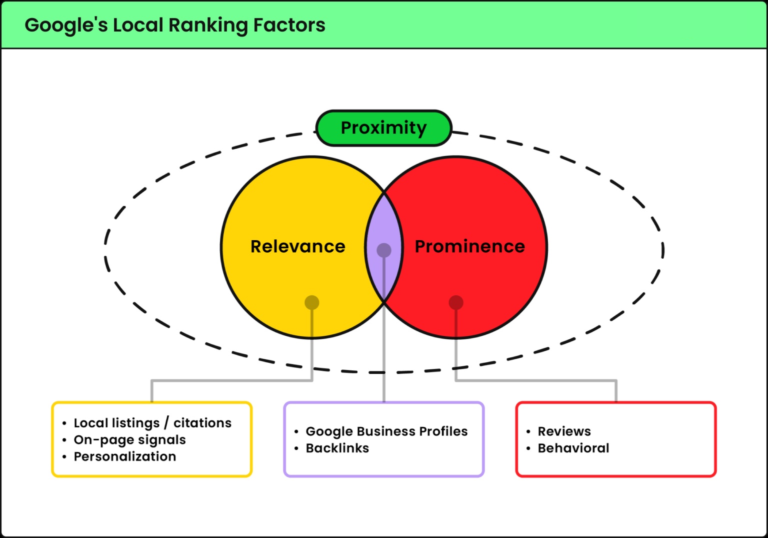
Google also uses proximity heavily. Businesses closer to searchers rank higher often. Physical addresses strengthen local relevance.
Which Option Is Better for Local SEO Strategy?
There is no universal best option. It depends on business operations. Both setups work when used correctly. Service area listings suit mobile businesses. Physical locations suit walk-in businesses.
A good local SEO strategy Google Business Profile aligns with the business type. Matching setup improves search relevance. Choosing the wrong setup weakens performance. Choosing correctly improves visibility and results.
Understanding your business model helps decision-making. Correct setup improves long-term growth.
How to Choose the Right Setup for Your Business Type
When to Choose Service Areas
Service areas work best for mobile businesses. These businesses travel to customers daily. They do not need customer visits onsite. Their work happens at customer locations instead. This makes service areas the right choice.
Plumbers often use this setup successfully. Electricians also rely on mobile work. Cleaning companies serve many homes daily. They move between different customer locations. These businesses do not need public offices.
A proper service area business listing helps define coverage clearly. You can add cities or postcodes. This tells Google where you operate. It improves local visibility in those areas.
This setup also protects private addresses. Many small businesses operate from home. Showing a home address sometimes feels uncomfortable. Service areas solve this problem easily. Customers still find your services nearby. It keeps your profile accurate and professional.
When to Choose a Physical Location
Physical locations suit customer-facing businesses. Customers visit these businesses directly. Shops, clinics, and offices follow this model. Restaurants also depend on physical visits.
The Google Business Profile address vs service area choice matters here. Businesses must show accurate address details. Customers expect to see your location clearly. They may need directions before visiting.
Showing your address builds stronger trust. It proves your business exists physically. Customers feel more confident choosing you. It also improves your local presence.
Google also prefers verified physical locations. These listings often rank better locally. They provide stronger location signals. This helps improve overall visibility. Choose this option if customers visit you. It ensures your listing reflects reality.
When You Can Use Both Service Areas and Physical Location
Some businesses benefit from both options. They have offices and travel too. Marketing agencies are a good example. Clients may visit their office sometimes. The agency may also visit clients often.
Correct Google Business Profile business information settings allow both setups. You can show your address publicly. You can also define service areas clearly. This improves your reach significantly.
Customers can choose what suits them best. They may visit your office directly. Or they may request onsite service. Both options increase convenience and trust.
This setup works well for growing businesses. It supports wider coverage and visibility. It also keeps your profile complete.
Step-by-Step Guide to Setting Up Service Areas or Physical Location Correctly
How to Set Up Service Areas in Google Business Profile
Start by opening your business dashboard. Go to your profile information section. Find the location and service area option. This is where changes can be made.
Select the service areas setting carefully. Add cities, towns, or postcodes. Choose areas you truly serve regularly. Avoid adding areas outside your reach.
Learning how to set up location in Google Business Profile prevents common mistakes. Accurate service areas improve search relevance. Google uses this data for matching.
You can hide your address if needed. This helps protect home-based businesses. Customers will see service regions only.
Always review your changes before saving. Small errors affect visibility later. Correct service areas improve profile performance.
How to Set Up a Physical Location Properly
Enter your full business address clearly. Include building number and postcode correctly. Avoid spelling errors or missing details.
The physical location Google Business Profile setup requires verification too. Google confirms your business location exists. This improves trust and authenticity. Check your map pin placement carefully. Incorrect pins confuse potential customers. Adjust it to match your entrance exactly.
Accurate address details help customers visit easily. It also strengthens your local presence. Verified locations perform better in search. Always keep your address updated. Current information improves search performance.
Common Setup Mistakes That Reduce Local Visibility
Many businesses choose incorrect business categories. This affects their search visibility negatively. Google may show them incorrectly.
Some businesses hide or show addresses wrongly. This creates confusion for customers. It also affects Google trust signals.
Selecting incorrect service areas weakens relevance. Businesses must choose realistic coverage areas. This improves local targeting.
Following proper Google Business Profile optimisation tips helps avoid errors. Review your profile regularly for accuracy. Correct details improve visibility and trust.
Accurate setup supports long-term business growth.
How Correct Location Setup Improves Your Google Business Profile Performance
Improves Local Search Visibility
Correct location setup helps your business appear in search. Google uses location to match nearby customers. When your details are correct, visibility improves faster. Your profile shows in relevant local results.
Businesses that optimise Google Business Profile for local SEO see better placement. Their listings appear in the right areas. This brings more views and enquiries. Accurate service areas help Google understand coverage clearly.
Correct addresses also improve trust signals. Google ranks profiles with accurate information higher. Better visibility brings steady customer enquiries. This supports long-term business growth.
Builds Trust With Potential Customers
Customers trust clear and accurate business details. A correct location makes your business look reliable. People feel more confident contacting you.
A clear location improves credibility naturally. Customers know where you operate from. They understand your service areas better. This removes confusion during decision making.
Verified profiles also look more professional. Customers trust businesses they can locate easily. Trust helps increase enquiries and conversions. It also improves customer confidence.
Helps Google Show Your Business to the Right Customers
Google wants to show relevant businesses. Accurate location helps match customer searches better. Your business appears for the right audience.
This supports strong local business profile optimisation and targeting. Google understands where you operate clearly. This improves search accuracy and visibility.
Better targeting brings more qualified customers. It also improves your overall profile performance.
Conclusion
Choosing the right location setup is essential. It directly affects visibility and trust. An incorrect setup reduces performance significantly.
Understanding Google Business Profile Service Areas vs. Physical Locations helps businesses make better decisions. Correct setup improves rankings and reach. It also increases customer confidence.
Businesses that configure properly see stronger results. They attract more local customers consistently. Accurate profiles perform better long-term.
Midland Marketing helps businesses optimise their profiles professionally. Our team ensures correct setup and improved visibility. We help businesses grow with proven local SEO strategies.
If your profile is not performing well, expert help makes a difference. Contact Midland Marketing today to improve your Google Business Profile and attract more local customers.
Frequently Asked Questions
What is the difference between service areas and physical locations in Google Business Profile?
The main difference is address visibility. Service area businesses hide their address. Physical locations show full address publicly. Understanding Google Business Profile Service Areas vs. Physical Locations helps choose correctly.
Should I show my business address or hide it?
This depends on your business type. Mobile businesses should hide address Google Business Profile. Physical shops should show addresses.
Can I use both service areas and physical location?
Yes, some businesses use both options. Businesses with offices and service coverage benefit from this setup.
Does location setup affect Google rankings?
Yes, location setup affects visibility greatly. Proper setup helps improve local rankings Google Business Profile and increases relevance.
How do I change my business location settings?
Access your profile dashboard. Open business information settings. Follow the Google Business Profile setup guide and update location details accurately.