


Introduction
Many local businesses struggle to appear online. Customers search Google before choosing services. They compare options quickly and decide fast. If your profile looks weak, they move on. This happens more often than expected.
An incomplete profile sends the wrong message. Customers may question your reliability and professionalism. They want clear details and recent updates. They also expect accurate contact information. Missing details reduce trust almost immediately.
Google also prefers active, complete profiles. Strong profiles improve Google Maps business visibility. They help customers discover nearby services faster. This supports your wider local SEO strategy naturally. Better visibility often leads to more enquiries.
Proper optimise your Google Business Profile perform better. Customers find your business with less effort. They trust your services more quickly. This improves engagement and conversion potential. It also helps improve business visibility on Google.
Many businesses overlook simple optimisation steps. They create profiles but never maintain them. Over time, this reduces performance and reach. Small improvements can make a big difference. Consistent updates help build long-term visibility.
This guide explains practical and proven methods. Each step helps strengthen your profile foundation. You will learn how to improve visibility safely. These methods support long-term local search growth.
Table of Contents
Complete Your Profile to Optimise Your Google Business Profile
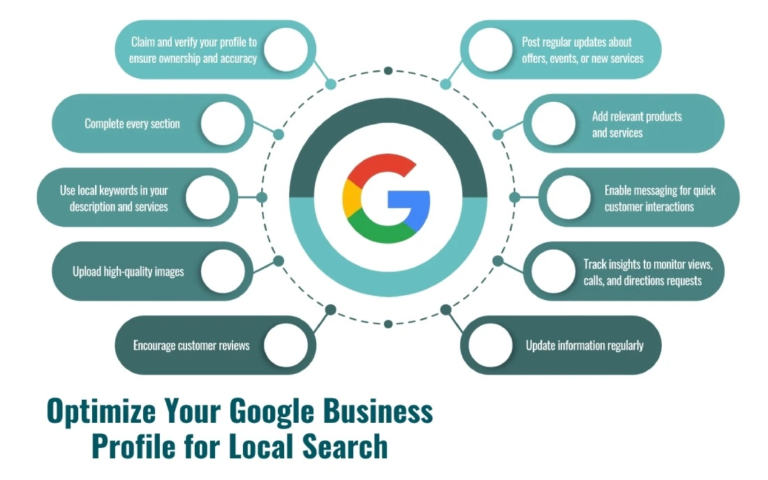
A complete profile helps your business rank better. Google prefers profiles with full information. Customers also trust clear and complete listings. Missing details can reduce visibility and enquiries.
Way 1: Keep Your Business Information Accurate
Accurate details help customers find your business. They also help customers contact you easily. Use your real business name only. Do not add extra keywords or words. Keep your details the same everywhere. This supports business profile completeness according to Google standards. It also builds customer trust.
Always use your correct business address. This helps Google match your location to nearby searches. If you serve multiple areas, include your service locations clearly. Always update the business information on Google when changes occur.
Your phone number must remain consistent everywhere online. This includes your website, directories, and social platforms. Consistency strengthens local business listing optimisation and improves search performance. Adding your website link also allows customers to learn more about your services.
Accurate information improves user experience and local search relevance. It helps both customers and Google trust your business profile.
Way 2: Choose the Right Business Categories
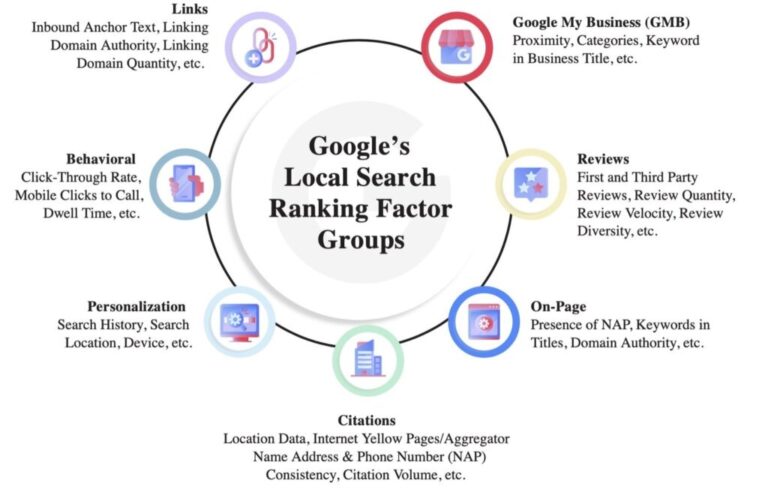
Business categories tell Google what your business does. Your primary category plays the most important role. It directly affects when your business appears in search results.
Pick the category that fits your main service. This improves search matching and visibility. Secondary categories can support additional services you offer. These help expand your reach without confusing search signals.
Following proper Google Business Profile best practices ensures stronger results. Categories affect your local search ranking. They help Google show your business to the right customers.
Correct category selection improves profile relevance and visibility. Choosing accurate categories strengthens your overall optimisation strategy.
Way 3: Add Accurate Opening Hours
Opening hours help customers plan their visits confidently. Incorrect hours can frustrate customers and damage trust. Always add your regular business hours clearly.
Update your hours during holidays or special events. This ensures customers receive accurate information. Google rewards profiles that provide reliable details.
Accurate hours also improve Google Business Profile management efficiency. Customers are more likely to contact businesses with clear availability. This helps enhance Google Business Profile visibility and engagement.
Keeping your hours updated builds trust and improves your profile’s performance.
Add High-Quality Photos to Improve Business Visibility
Photos shape first impressions quickly. People notice visuals before reading text. Images help explain your business naturally. They show your environment and services clearly. This builds trust without extra explanation. Visual content also improves local engagement.
Way 4: Add Clear and Real Photos
Customers want real business photos. Clear images build trust quickly. Outside photos help people find you. Inside photos show your real space. This makes your business feel honest.
Service photos show your daily work. They show tools, results, and effort. People trust what they can see. This helps them choose your business faster. Always add photos to Google Business Profile. This improves your profile strength.
Good photos improve business visibility on Google. They also increase clicks and enquiries. Real photos make your business approachable.
Way 5: Update Photos Regularly to Improve Visibility
Outdated photos weaken your business image. Customers may assume your business is closed. Fresh images show ongoing business activity. This keeps your profile current and relevant.
Upload new photos whenever possible. Show recent work and improvements clearly. Real images improve customer confidence quickly. They also help enhance Google Business Profile visibility. Active profiles perform better in search.
Regular updates support Google Maps ranking improvement. Google prefers active and maintained profiles. Updated visuals show consistent business activity. This helps your profile stay competitive locally.
Add Clear Business Details for Better Local SEO
Clear and detailed business information improves search relevance. This helps Google see what you do. It helps your business appear in relevant searches.
Way 6: Write a Clear Business Description
Your business description explains what you offer and who you serve. Keep it simple and easy to understand. Avoid complex language or keyword stuffing.
Include your main services and service areas naturally. This helps Google understand your business better. A clear description helps customers understand your business quickly.
Strong descriptions support your local SEO optimisation strategy and improve profile performance. They also build trust and credibility. Well-written descriptions strengthen your visibility and customer engagement.
Way 7: List Your Services and Products Clearly
Service listings help customers understand your offerings. They also improve search matching and profile relevance. List your services clearly using simple language.
Include important services and key offerings. This helps optimise Google Business Profile for local SEO and improves visibility. Customers prefer businesses that clearly explain their services.
Accurate listings strengthen business listing SEO and improve search performance. They also make it easier for customers to choose your business. Clear service information supports better local search results.
Build Trust to Improve Local Search Visibility
Trust shapes buying decisions every day. People check reviews before calling. Google also looks at trust signals. Strong feedback supports better local search visibility.
Way 8: Encourage and Manage Customer Reviews
Reviews influence both trust and rankings. Positive feedback can improve Google Business Profile ranking over time. Real experiences feel honest and reassuring. They help new customers decide faster.
Ask happy customers for reviews politely. Keep it simple and respectful. Never pressure or reward reviews unfairly. Genuine comments carry more weight.
Reply to feedback when possible. Thank customers for their kind words. Address concerns calmly and professionally. Active responses show care and accountability. This steady approach builds reputation and strengthens trust naturally.
Keep Your Profile Updated for Long-Term SEO Success
Optimisation is not a one-time job. Your profile needs regular care. Small updates help maintain strong visibility. This keeps your business easy to find.
Way 9: Update Your Profile Often
Active profiles rank better in search. Google prefers businesses that stay active. Add new photos when possible. Check your details for accuracy. Fix errors as soon as possible.
Regular updates show your business is open. This improves your Google Business Profile SEO strategy results. It also supports local SEO performance improvement. Active profiles stay competitive longer. Keeping your profile fresh builds trust. It also improves search visibility over time.
Way 10: Match Your Profile with Your Website
Your profile should match your website. Use the same contact details everywhere. This keeps your business information clear.
Consistency improves your local SEO strategy strength. It also supports better Google Maps SEO performance. Matching details improves customer trust quickly. A clear and accurate profile helps customers. It also supports long-term SEO growth.
Conclusion
Your Google Business Profile plays a critical role in local SEO success. It helps customers find and trust your business. Complete and accurate profiles perform better in search results. Regular updates and proper optimisation improve long-term visibility.
When you optimise your Google Business Profile well, you get more enquiries. You also attract more customers. Strong profiles improve business visibility on Google and strengthen your local presence.
Midland Marketing helps businesses improve their local search performance. Our team creates effective Google Business Profile optimisation strategies tailored to your goals. We help improve visibility, engagement, and growth.
If you want better local SEO results, Midland Marketing can help. Contact our team today to optimise your profile and grow your business.
Frequently Asked Questions
Why should you optimise your Google Business Profile?
Optimisation improves local search visibility and helps customers find your business. Complete profiles build trust and improve engagement. Optimised profiles perform better in Google Maps and local search results.
How does Google Business Profile optimisation improve local SEO?
Google uses profile information to match businesses with search queries. Proper optimisation makes your local SEO strategy stronger. It also improves search visibility and relevance.
How long does it take to improve Google Maps rankings?
Results vary depending on competition and optimisation quality. Most businesses see improvements within weeks. Consistent updates help improve Google Business Profile ranking faster.
What details are most important in a business profile?
Accurate name, address, phone number, services, and hours are essential. These support business profile completeness, Google requirements, and improve trust and rankings.
How often should you update your Google Business Profile?
Update your profile whenever business information changes. Regular updates improve performance and support effective Google Business Profile management.