

Introduction
If you spend enough time in SEO, you notice a pattern. The sites that win are not the loudest. They are the clearest. Structure always outperforms shortcuts because algorithms change, tactics expire, but a clear hierarchy continues to deliver results.
It is more than a large headline. It defines the page, frames the topic, and signals intent before a single paragraph is read. When the H1 is written with purpose, search engines understand the page faster. Users grasp the subject in seconds. Consequently, the content is organised, clear, and easy to locate. Without this, the topics become vague, the signals lose their strength, and the page in general loses its power.
This guide explains what an H1 tag is and how SEO works. It also shows how to optimise H1 elements within your on-page headings for stronger visibility and clearer structure.
Table of Contents
What Is an H1 Tag?
Definition
It is the primary HTML heading element on a webpage. It defines the main topic of that page.
In the code, it looks simple: <h1>Your Heading</h1>. But function matters more than form. It is not just design. It is structured.
The main heading signals the core subject to search engines. It tells crawlers, “This is what this page is about.” Everything else H2s, H3s, supporting copy builds underneath it.
For users, it acts as confirmation. They land, scan, and read the H1. If it matches their expectation, they continue. If not, they leave. It’s that direct.
Where the Main Heading Appears on a Page
It usually appears at the top of the visible content. Often, it is the largest heading on the page.
It typically aligns closely with the overall page topic. In many cases, it resembles the title tag. But unlike the title tag, it is visible within the page itself.
It matters since visitors read it, and assistive tools depend on it. It is visible content, not background code.
H1 Tag vs Title Tag: What’s the Difference?
This is where confusion often begins. The title tag appears in search results. It is the clickable headline in the SERP. The main heading appears on the webpage.
They can be similar. Sometimes nearly identical. But their roles differ. Title tags are made for search engine results pages. An H1 is meant for on-page SEO headings and content hierarchy. One is there to get the click, the other to justify the click.
Why it Matters for SEO
Helps Search Engines Understand Page Topic
Search engine crawlers interpret HTML heading tags to understand the structure.
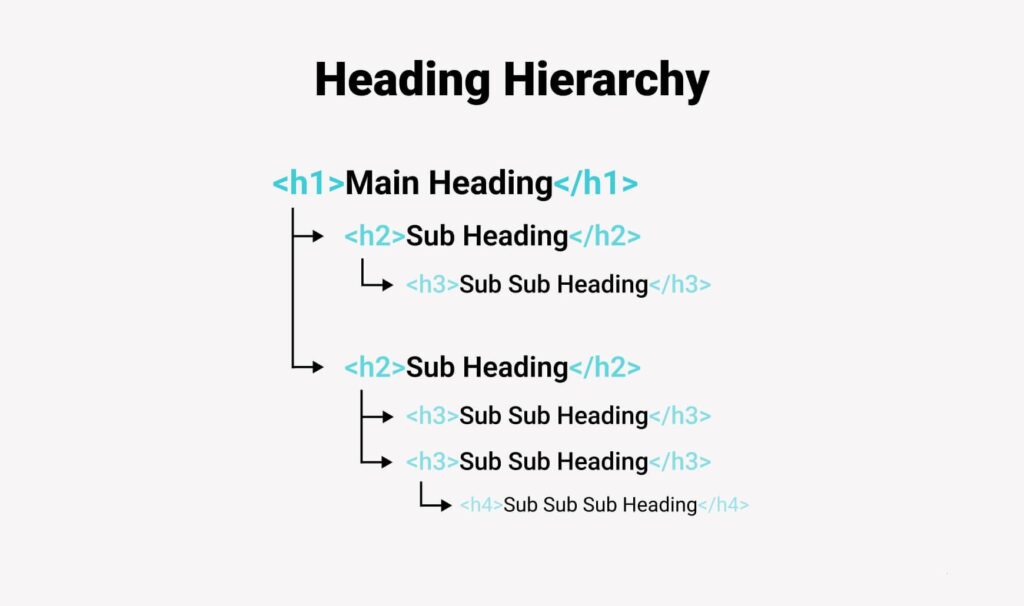
The H1 sits at the top of the page hierarchy. It establishes the primary theme. H2 headings divide sections. H3 headings refine them further.
Without a clear H1, the content structure weakens. Search engines may struggle to determine the dominant topic. That ambiguity affects ranking signals.
Clarity is power here.
Supports Keyword Relevance
Featuring your primary keyword in the heading supports better optimisation. It reinforces topical focus. It tells search engines the page aligns with a specific query.
There is a fine line, as over-optimisation can damage credibility. Keyword stuffing in an H1 feels unnatural, and both readers and algorithms notice it.
Strong SEO keeps the language natural, direct, and human.
Improves User Experience and Readability
A strong H1 improves user experience immediately. It confirms the relevance of the content, decreases uncertainty and lowers the bounce rate as users feel the content is aligned with them.
SEO headings that are clear and descriptive help to create a natural flow that is predictable. Readers know their location and what they are going to learn. That sense of orientation improves engagement.
Sometimes, the simplest improvements deliver the strongest results.
Contributes to On-Page SEO Structure
The H1 anchors the entire SEO heading structure.
- H1 defines the main topic.
- H2 introduces sections.
- H3 expands on subsections.
This logical structure improves semantic clarity. It strengthens SEO optimisation across the page. It supports content structure that both humans and search engines can interpret easily.
Best Practices for Using an This Tag
Use Only One H1 Per Page (Generally Recommended)
Traditional SEO advice has always pointed to the use of only one H1 per page. The reason? Clear communication is essential. Having several H1 headings can lead to the spreading out of the main theme of the page. It sends mixed messages to the search engines regarding the real subject of the page.
HTML5 technically allows multiple H1s inside sectioning elements. But in practice, one dominant H1 remains the clearest approach for SEO and website accessibility.
Include Your Primary Keyword Naturally
Your primary keyword should appear in the H1, but it must feel natural. Avoid awkward phrasing or repeating variations in the same line.
Match search intent. If users are searching “what is an H1 tag,” your H1 should reflect that clearly. Avoid abstract or vague language, as precision is what builds trust.
Keep It Clear and Descriptive
Headings like “Home” or “Welcome” offer no clarity. They fail to communicate the page’s purpose. They weaken ranking signals and waste opportunities.
Instead, describe the topic directly and reflect user intent. A meaningful H1 should prioritise clarity over decoration.
Maintain Logical Heading Hierarchy
Correct heading tag structure matters.
- H1 → main topic
- H2 → major sections
- H3 → supporting subsections
Avoid skipping levels without a reason. Jumping from H1 to H4 disrupts the page hierarchy. It confuses crawlers and complicates navigation for assistive technologies.
Common Mistakes to Avoid
Lack of a Clear Page Title
A missing H1 weakens topical signals. Search engine crawlers lose a clear reference point. Screen readers lose a starting marker. Content structure becomes less defined. It is a small technical oversight with large implications.
Using Multiple Main Headings Incorrectly
Some content management systems produce duplicate top headings automatically. Logos wrapped in H1 elements. Section headers duplicated as H1s. Overuse fragments clarity, so audit your HTML elements and review the page source. Maintain one clear primary H1 that defines the page.
Duplicate H1 Across Multiple Pages
Using the same top-level heading across pages can confuse search engines. If multiple pages share the same primary heading, keyword targeting becomes blurred. Search engines struggle to distinguish intent. Each page deserves a distinct, descriptive H1 aligned with its unique purpose.
Keyword Stuffing in H1
Overloading the H1 with keywords harms readability. It feels forced, reads like a checklist. That damages user experience. Natural language improves engagement. Engagement supports SEO optimisation. The connection is indirect but real.
The Role of Page Headings in SEO
Connection with Content Structure
The H1 supports broader content structure and semantic SEO.
In topic clusters and pillar pages, the H1 defines the central theme. Supporting H2 and H3 headings expands related subtopics. This layered format strengthens contextual relationships. Search engines interpret these signals collectively. The H1 sets direction. The rest of the page follows.
Role in Featured Snippets and SERP Visibility
Clear heading structure improves scannability. When content is organised logically, search engines can extract concise answers more easily. That increases featured snippet potential.
While the title tag influences SERP visibility, the H1 reinforces clarity once users land. Together, they strengthen presence and performance.
Impact on Accessibility
Website accessibility depends on proper HTML heading tags. Screen readers use the H1 as a navigation starting point. Users can jump between headings efficiently when the structure is correct. Good SEO and accessibility often align naturally. Strong structure benefits everyone.
How to Refine Your Primary Page Title
Step 1 – Identify Primary Keyword
Begin with keyword research.
Determine the main target term for the page. This becomes your primary keyword. It should reflect genuine search demand and match user intent. Clarity matters more than volume alone.
Step 2 – Align with Search Intent
Identify whether the intent is informational, commercial, or transactional.
An informational page might use a question-based H1. A commercial page should clearly describe a service. Alignment improves engagement and strengthens ranking signals.
Step 3 – Make It User-Focused
Balance SEO with readability.
If the H1 sounds mechanical, rewrite it. If it feels stuffed with keywords, simplify it. Strong headings feel natural and almost obvious, and that simplicity is intentional.
Step 4 – Review in Page Source
- Always check the page source.
- Confirm only one H1 exists.
- Ensure correct HTML formatting.
- Verify there are no duplication errors.
- Technical precision supports structural clarity.
Examples of Effective and Ineffective Headings
Weak Example
- “Home”
- “Welcome to Our Website”
These headings lack clarity. They provide no keyword placement and offer no insight into the page topic. Search engines receive weak signals. Users receive no direction.
Strong Example
- What Is an H1 Tag? Why It Matters for SEO”
- “Retail Security Services in Birmingham”
These headings succeed because they are descriptive. The primary keyword appears naturally. The intent is clear. They strengthen page hierarchy, improve user experience, and reinforce SEO optimisation.
Final Thoughts: Why it Still Matter in Modern SEO
It remains a foundational element of on-page SEO. It defines page hierarchy. It strengthens content structure. It clarifies keyword targeting. It supports website accessibility.
While algorithms evolve and ranking factors change, structural clarity still matters.
Having a perfectly optimised H1 tag alone will not get you to the top of the rankings. However, if you don’t have it, your SEO heading structure will become extremely weak from the top down. Start with clarity and then develop your work Contact us for more information.
Frequently Asked Questions
Do I really need an H1 tag on every page?
Yes. Each page should have one clear main heading. It tells search engines and users what the page is about.
Can I use more than one H1?
You can. But it often creates confusion. One strong H1 is cleaner and safer.
Should the H1 match the title tag exactly?
Not always. They can be similar, but they serve different roles. The title tag attracts clicks. The H1 explains the page.
Does putting keywords in the H1 guarantee rankings?
No. It helps with relevance, not magic results. Content quality and intent still matter more.
What happens if my H1 is too vague?
Users may leave. Search engines may struggle to define your topic. Clear beats clever.