

Introduction
Search engines cannot rank content that they cannot reach. That is where crawl errors quietly break SEO performance. Many teams see warnings in Search Console and move on. That is a mistake. Crawl errors in SEO are not cosmetic issues. They block search engine crawling, slow discovery, and waste crawl budget on broken paths.
When pages fail to load, redirect badly, or return the wrong signals, visibility drops before rankings ever start. This is why crawl problems feel invisible but hit hard. It affects traffic and causes strong pages to stop getting attention.
This guide breaks it down in simple language to help you understand how bots access your site, where failures happen, and why some errors matter more than others. The focus is clarity. You will see what blocks visibility, what to fix first, and how to correct actions to protect long-term SEO performance.
Table of Contents
What Are Crawl Errors in SEO?
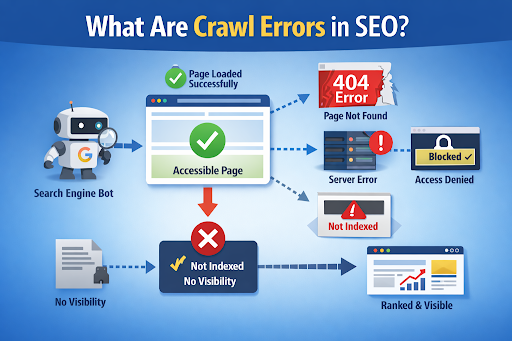
Crawl errors happen when a search engine tries to access a page but cannot reach it. The page may exist, but something blocks entry. This could be a server issue, a broken link, poor site structure, or restricted access rules. From the search engine’s view, the door is closed.
These website crawl issues stop progress early. Search engines rely on clean access to move through a site. When access fails, the page is skipped. It is not judged and ranked. This is why Google crawl errors matter more than many surface-level SEO technical issues. They interrupt discovery itself.
Crawl errors are not penalties. They are signals of access failure. Fixing them restores the path between your site and search engine crawling systems.
How Search Engines Crawl Websites
Search engines use automated bots to explore the web. They discover URLs through internal links, external links, and XML sitemaps. Each found URL is added to a crawl list.
Crawling always comes before indexing. A page must be reachable before it can be reviewed. If bots cannot load the page, they cannot read content, follow links, or assess quality.
Finding a URL is not the same as understanding it. Discovery only adds the page to the queue. Access allows evaluation. Without access, ranking is impossible. Site accessibility SEO issues often begin here, not at the content level.
Crawling vs Indexing: Why the Difference Matters
Crawling means access. Indexing means analysis and storage. They are separate steps.
When crawl errors appear, pages fail at step one. Indexing never starts. This is why fixing crawl errors is not optional. It protects crawl budget, prevents wasted requests, and ensures important pages are eligible for evaluation.
Understanding indexing vs crawling helps teams prioritise correctly. If a page is not crawlable, no optimisation beyond that point can help.
Why Crawl Errors Matter for SEO Performance
Crawl errors feel technical, but their impact is commercial. When search engines hit access issues, they do not just skip a page. They adjust how they treat the whole site. Repeated website crawl issues send a message that parts of the site are unreliable or hard to reach.
This affects visibility first, then traffic. Over time, it limits growth. Google crawl errors shape how often bots return, how deep they crawl, and which areas they ignore. That is why crawl errors in SEO are not isolated problems. They influence perception, coverage, and priority.
How Crawl Errors Impact Rankings and Visibility
Pages with crawl errors cannot rank. They are never evaluated. But the damage spreads further.
- Internal links pointing to broken pages pass value into dead ends.
- Important URLs lose attention while low-value paths still get crawled.
- Large error volumes weaken site quality signals over time.
Search engines look for efficiency. When too many paths fail, trust drops. Fix crawl errors early to protect visibility across the site, not just on affected URLs.
Crawl Errors and Crawl Budget Waste
Crawl budget is the time and effort search engines spend on your site. It is not unlimited.
Repeated errors drain that budget fast. Bots retry failed URLs, hit redirects, or time out on slow pages. That means fewer successful crawls elsewhere.
This matters most when:
- The site is large
- Content updates often
- New pages need fast discovery
Wasted crawling delays indexing and slows performance gains. Google Search Console crawl errors often reveal this pattern clearly.
When Crawl Errors Become a Business Risk
Some crawl errors block revenue paths directly.
- Product pages that are not crawled never appear in search.
- Location pages fail, reducing local visibility.
- Blog content gets ignored due to poor structure or access rules.
These are not SEO-only problems. They affect leads, sales, and brand reach. Search engine crawling issues can quietly undermine results if left unresolved.
Common Types of Crawl Errors You Should Know
Not every crawl warning needs panic. Patterns matter more than volume. Understanding common Google crawl errors helps you focus on what actually blocks search engine crawling.
404 Errors and Broken URLs
A 404 error means a page cannot be found. This often happens when pages are deleted, URLs change, or internal links point to old paths.
Some 404s are harmless, like removed campaign pages. Others cause damage:
- Internal links leading to 404s waste authority
- Important pages disappear from crawling paths
- User journeys break
Internal 404s matter far more than external ones because they weaken site structure and accessibility.
Server Errors (5xx Issues)
When clicks drop, cost per acquisition rises. You pay the same amount for impressions, but you get fewer actions from them. That’s the classic PPC performance issue: spend goes up, results go down.
Redirect Errors and Chains
Redirects guide crawlers, but excess causes confusion.
- Clean redirects pass signals clearly
- Chains and loops slow crawling
- Long paths dilute value
Too many redirects drain crawl budget fast.
Blocked URLs (Robots.txt and Noindex Issues)
Blocking often happens by accident during site changes.
- Old rules stay alive
- Test settings reach production
- Pages appear in reports but stay inaccessible
This mismatch creates ongoing website crawl issues and reporting confusion.
How to Identify Crawl Errors Correctly
Finding crawl errors is easy, but understanding them is harder. The goal is not to fix everything, but to fix what blocks access and visibility. An accurate review prevents wasted effort and missed priorities.
Using Google Search Console to Find Crawl Errors
Google Search Console crawl errors appear mainly in the Pages and Crawl stats reports. These show where Google failed to access URLs and how often it tried.
Focus on patterns, not counts:
- Errors on important pages matter first.
- Repeated failures signal real site accessibility SEO issues.
- Old or excluded URLs may not need action.
Not every warning is urgent. Some reflect intentional removals or low-value pages. Prioritisation protects crawl budget and avoids unnecessary SEO technical issues.
When Third-Party SEO Tools Add Value
SEO tools support, not replace, Search Console. They scan from different angles and uncover issues Google may not flag clearly.
They help by:
- Finding internal broken links
- Mapping redirect chains
- Highlighting blocked URLs across templates
Tool alerts should never be trusted blindly. Always validate against live pages and server responses. Manual checks confirm whether an issue affects search engine crawling or is just a data mismatch.
How to Fix Crawl Errors the Right Way
Fixing crawl errors is about judgment, not speed. Poor fixes often create deeper SEO technical issues than the original problem. The aim is stable access, not clean reports.
Prioritising Crawl Errors Based on SEO Impact
Not all crawl errors carry equal weight. Start where loss is real.
High-impact errors usually affect:
- Pages with organic traffic
- URLs with internal or external links
- Pages tied to user intent or conversions
Low-impact errors often involve expired content or unused paths. Fix crawl errors blindly, and you waste crawl budget while ignoring real blockers.
Correct Fixes for Common Crawl Errors
The right fix depends on intent.
- Redirect when a page has a clear replacement.
- Restore content if demand still exists.
- Leave errors when removal is intentional and clean.
Each choice affects search engine crawling differently. The goal is clarity. Mixed signals confuse bots and delay indexing vs crawling decisions
Validating Fixes Without Creating New Problems
Fixes must be verified. Re-crawling confirms access is restored.
- Check live status, not cached data.
- Monitor crawl behaviour changes.
- Watch for redirect chains or duplicate paths.
Rushed fixes often cause loops, blocks, or wasted crawl budgets. Careful validation protects long-term visibility.
Preventing Crawl Errors in the Future
Crawl health is not a one-off fix. It needs steady care. Small changes across a site can quietly create website crawl issues if left unchecked.
Crawl-Friendly Site Structure and Internal Linking
Clean structure guides search engine crawling.
- Logical hierarchy helps bots move with purpose.
- Clear internal links reduce dead ends.
- Orphan pages waste crawl budget and stay unseen.
When links follow intent, access improves. Site accessibility SEO starts with how pages connect, not with tools.
Monitoring Changes After Migrations and Updates
Crawl errors often rise after a change. New paths break old ones.
Watch closely after:
- Redesigns
- CMS updates
- URL or navigation changes
Check Google Search Console crawl errors before and after updates. Compare crawl stats. Pre- and post-change checks catch access failures early and protect the indexing vs crawling flow.
Crawl Errors as an Ongoing SEO Health Signal
Crawl errors are not noise. They are feedback. Search engines use crawl behaviour to judge how reliable a site feels over time. When access is clean, trust builds.
What Crawl Errors Tell You About Site Quality
Crawlability reflects care.
- Fewer access failures signal strong site accessibility SEO.
- Persistent errors suggest neglect or poor maintenance.
- Clean crawl paths support stable search engine crawling.
When Google crawl errors keep repeating, bots reduce effort. Pages get less attention, and indexing becomes slow. By monitoring crawl errors in SEO regularly, teams spot structural decay early and protect long-term visibility without reactive fixes.
Conclusion: Turning Crawl Health into Lasting SEO Strength
Crawl errors affect access, efficiency, and trust. They decide how search engine crawling treats a site long before rankings move. Not every issue needs action, but ignored patterns weaken visibility over time.
When crawl errors in SEO are fixed with intent, crawl budget improves and site quality signals strengthen. This foundation supports every SEO effort that follows. For strategic support and correct prioritisation, Midland Marketing helps turn crawl data into long-term growth.
Frequently Asked Questions
- What is the most serious crawl error for SEO?
Errors that block access to important pages cause the most damage. Server failures, blocked URLs, and broken internal links stop search engine crawling completely.
- Do crawl errors always hurt rankings?
No. Low-value or intentionally removed pages may not matter. Problems begin when crawl errors affect pages tied to traffic, links, or user intent.
- How often should crawl errors be checked?
Review them monthly for stable sites. Check weekly after updates, migrations, or content changes to protect crawl budget.
- Are 404 errors always bad for SEO?
No. Clean 404s are fine for removed pages. Internal 404s are harmful because they waste authority and break access paths.
- Can crawl errors affect indexed pages?
Yes. Persistent access issues can cause indexed pages to drop out over time.