


Introduction
A strong website does not win by chance. It wins due to a solid foundation. Content may attract attention, and design may build trust. But without a proper technical SEO audit checklist, even great pages can struggle to rank.
This guide gives you a complete technical SEO audit framework for 2026. It works for both large enterprises and small business sites. It follows a clear system, focuses on results and avoids fluff. Use this blog as your full SEO audit checklist and the base of your Technical SEO Strategy.
Table of Contents
Why Technical Integrity is the Multiplier of Content Success
Many teams focus on blogs, landing pages, and backlinks. That is useful, but content cannot perform if search engines cannot access it.
The Concept of “Technical Debt”
Technical debt builds slowly. A broken redirect here. A duplicate page there. Slow scripts. Old plugins. Each issue looks small. Together, they reduce crawl efficiency, waste ranking signals, and lower ROI.
For ecommerce and small businesses, this debt can:
- Block product pages from indexing
- Create duplicate content
- Reduce site speed
- Damage trust signals
The Audit Lifecycle
Many companies treat audits as one-time events. That approach is outdated. In 2026, the smart model is continuous monitoring. A modern website technical SEO audit
is not a report. It is a process. The following turns technical SEO from reactive to proactive.
- Monthly crawl reviews
- Weekly error tracking
- Real-time alerts
- Ongoing performance checks
The 2026 Indexing Landscape
Search engines now value efficiency. They reward clean architecture, fast response times, and clear signals. Volume alone no longer helps. If your site is slow or messy, it will lose attention. Efficiency is now the ranking advantage.
Refined crawling patterns mean:
- Better use of crawl budget
- Stronger focus on quality pages
- Faster detection of structure issues
Crawlability and Indexability – Ensuring the Path is Clear
This phase is the core of any technical SEO audit checklist. If search engines cannot crawl your pages, nothing else matters.
Optimising the Crawl Budget for High-Inventory Sites
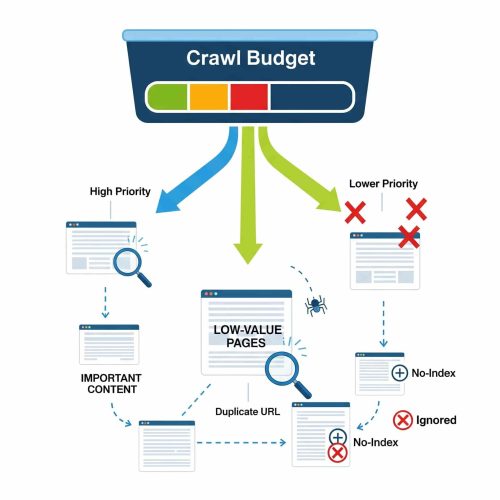
Large ecommerce sites face a common issue. Too many URLs. Thousands of SKUs can drain crawl resources. Low-value URLs weaken authority. Prune them. This improves crawlability and indexability at scale.
To protect crawl budget:
- Remove thin or empty pages
- Block internal search results
- Reduce parameter-based duplicates
- Fix redirect chains
Resolving JavaScript Rendering Obstacles
Modern websites rely on JavaScript. That can create problems. Search engines must see the same content users see. Test your site using:
- Google Search Console URL inspection
- Rendering tools
- View source comparison
- Server-side rendering checks
Compare “Rendered HTML” with the raw code. If important text appears only after scripts run, fix it. The goal is to make sure content is visible to search bots.
Triage for “Discovered - Currently Not Indexed” Reports
This status in Search Console often signals deeper issues. If the page adds value, improve signals and resubmit.
Follow this workflow:
- Check internal links.
- Confirm index directives.
- Inspect canonical tags.
- Review content depth.
- Test page speed.
Structural Integrity - Architecture and URL Logic
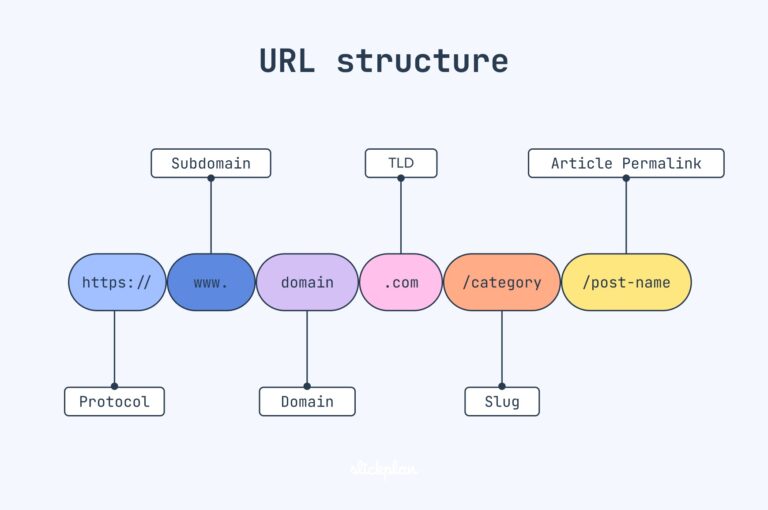
A strong structure improves both users and bots. This is website architecture optimisation in action. Logical structure improves engagement and strengthens internal links.
Flat vs. Deep Hierarchy: The 3-Click Rule for 2026
Users and crawlers prefer simple paths. Important pages should be reachable within three clicks. Keep directories clean and avoid long chains. Example: Home → Category → Product
Orphan Page Discovery and Re-Integration
Orphan pages have no internal links. They are invisible to users and difficult for crawlers.
Find them using:
- Log file analysis
- Site crawl tools
- Analytics page reports
Once found, link to them from related pages. Placing internal links within the pages restores equity and visibility.
Canonicalization and Parameter Handling
Ecommerce sites use filters. Size. Color. Price. These can create duplicate URLs. Use canonical tags carefully. This keeps your index clean and prevents signal dilution.
Also:
- Control URL parameters
- Avoid indexing filtered combinations
- Standardise product variants
The Directives Layer - Mastering Robots.txt and XML Sitemaps
Robots.txt as a Precision Tool
Robots.txt controls crawling. It does not remove pages from search results. Many teams confuse blocking with de-indexing.
If you want to remove a page, use:
- Noindex tags
- Proper redirects
- Content removal
Use robots.txt only to guide crawl behaviour. You can also control specific AI crawlers when needed. Also, always try to test before deployment.
Dynamic XML Sitemaps: Cleanliness over Completeness
Your XML sitemap and robots.txt setup must stay accurate. These help specialised content appear in visual search results.
Best practices:
- Include only 200-status URLs
- Remove redirects
- Remove broken links
- Update automatically
Clean sitemaps improve trust and efficiency.
Also consider:
- Image sitemaps
- Video sitemaps
The Performance Mandate - Core Web Vitals Optimisation
Core Web Vitals optimisation affects rankings and user behaviour.
Solving for INP (Interaction to Next Paint)
INP measures responsiveness. If users click and wait, frustration grows. A fast-feeling site converts better.
Improve it by:
- Reducing heavy scripts
- Delaying non-essential JavaScript
- Minimising third-party code
- Using efficient event handling
LCP and the Visual Stability Paradigm
Largest Contentful Paint measures loading speed. The goal is quick visual delivery.
Improve LCP by:
- Using WebP or Avif images
- Enabling CDN edge caching
- Setting image dimensions
- Using Fetch Priority for key assets
Eliminating Cumulative Layout Shift (CLS)
CLS happens when elements move unexpectedly. Stable layouts build trust.
Fix it by:
- Reserving space for images
- Setting fixed ad containers
- Avoiding late-loading fonts
- Testing pop-ups carefully
Mobile-First Indexing - The Universal Standard
Search engines now use mobile versions for indexing. This is called mobile-first indexing.
The Parity Audit: Desktop vs. Mobile Content
Check that both versions match. Hidden mobile content inside toggles or accordions should still exist in the HTML. Content differences can harm rankings.
So Make Sure About:
- Same headings
- Same structured data
- Same internal links
- Same meta tags
Responsive Design vs. Adaptive Delivery Technical Check
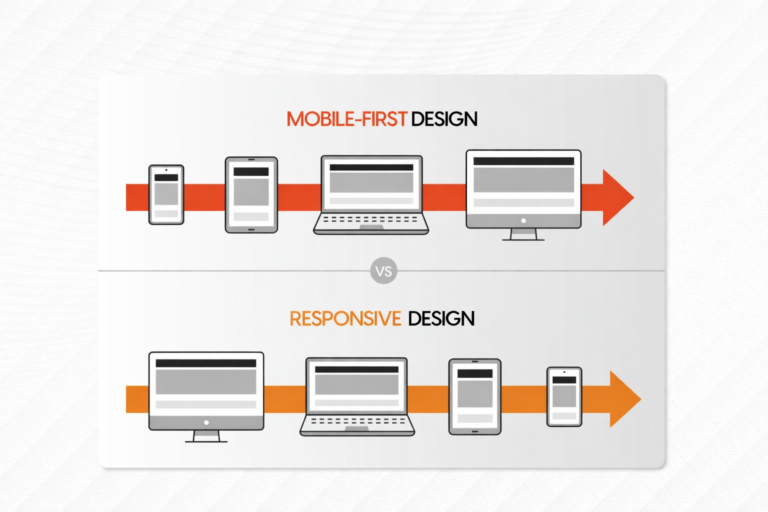
Most sites use responsive design. Avoid technical gaps between versions.
Confirm:
- Proper viewport settings
- No conflicting mobile redirects
- Correct user-agent handling
- Consistent metadata
Touch-Target and Viewport Scaling
Mobile UX affects conversions. A smooth mobile journey supports revenue growth.
Check the following:
- Button size
- Spacing
- Scroll behavior
- Form usability
Maintenance and the Technical SEO Tech Stack
Audits should not end. They should run in cycles.
Setting Up Automated Alert Systems
Move from manual checks to automated monitoring. Quick response prevents ranking loss.
Set alerts for:
- 404 errors
- Server failures
- Redirect spikes
- Indexing drops
Key Tools for In-House SEO Teams
Different tools serve different needs. Large enterprises may need both. Small businesses can start with crawl tools and expand later. This forms a strong website technical SEO audit system. Crawl-based tools help with:
- Structure analysis
- Broken links
- Meta issues
Log-based tools help with:
- Real crawl behaviour
- Bot activity
- Server response patterns
Conclusion: Turning the Checklist into a Roadmap
A checklist is useful, but a roadmap is powerful. After completing your technical SEO audit checklist, rank issues by:
- Ease of fix
- Impact on revenue
- Risk level
- Traffic potential
Start with high-impact fixes. Then plan quarterly sprints, assign tasks to developers, and track progress. Over time, your technical SEO audit checklist becomes a living system. That is how you move from problem-solving to growth. When technical foundations are strong, content performs better. When the structure is clean, crawl efficiency improves. Faster performance lets users stay longer. This is the true value of a complete technical SEO strategy.
Frequently Asked Questions
1. What is included in a technical SEO audit checklist?
A technical SEO audit checklist includes crawlability, indexability, site structure, performance, and mobile checks. It also covers Core Web Vitals optimisation, XML sitemaps, robots.txt, and duplicate content control.
2. How often should a website’s technical SEO audit be done?
A full website technical SEO audit should be done at least every quarter. However, ongoing monitoring is recommended to catch errors, speed issues, and indexing problems early.
- Why is crawlability and indexability important for rankings?
If search engines cannot crawl or index your pages, they cannot rank them. Improving crawlability and indexability ensures your content is discovered and properly evaluated.
4. How does Core Web Vitals optimisation impact SEO?
Core Web Vitals optimisation improves user experience by enhancing speed, stability, and responsiveness. Better performance signals can support higher rankings and increase engagement and conversions.
5. Is mobile-first indexing important for small business websites?
Yes, mobile-first indexing applies to all websites, not just large enterprises. If your mobile version is weak or incomplete, it can directly affect your search visibility and traffic.